spora [data]
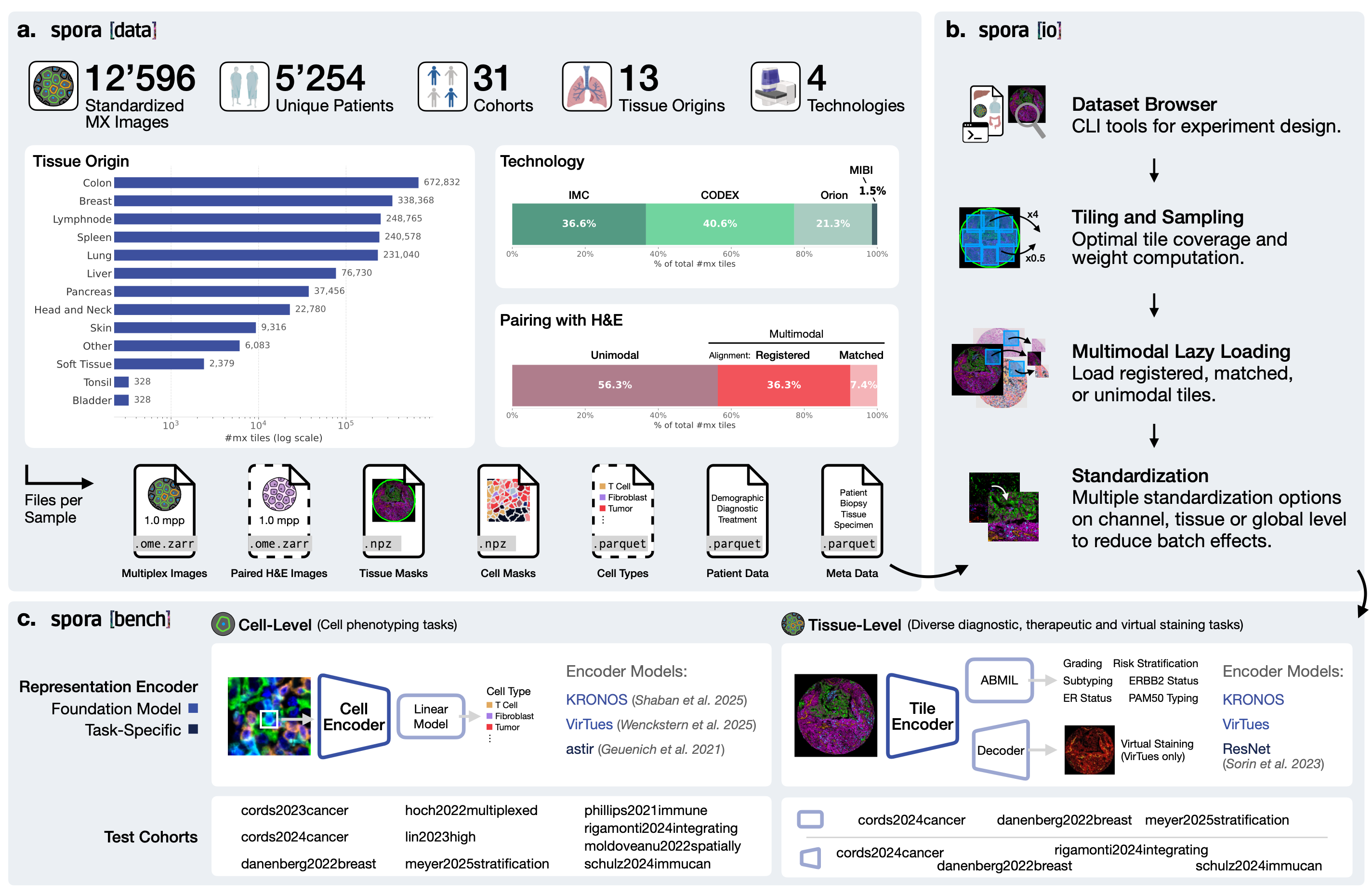
Data format specification and download instructions for the spora spatial proteomics dataset.
On this page
Downloading Data
spora datasets are hosted on the EPFL RCP object store and accessed via rclone. Use the password we provide separately when requesting the bucket.
1. Install rclone v1.67
Choose the archive matching your platform from downloads.rclone.org/v1.67.0/. Example for macOS (Apple Silicon / arm64):
cd ~/Downloads
curl -O https://downloads.rclone.org/v1.67.0/rclone-v1.67.0-osx-arm64.zip
unzip rclone-v1.67.0-osx-arm64.zip
cd rclone-v1.67.0-osx-arm64
sudo mkdir -p /usr/local/bin
sudo cp rclone /usr/local/bin/
sudo chmod +x /usr/local/bin/rclone
sudo chown root:wheel /usr/local/bin/rclone
2. Access the bucket with the provided password
Use the bucket name spora and pass the provided credentials in the S3 endpoint URL:
rclone ls :s3:spora --s3-endpoint "https://USER:PASSWORD@datasets.epfl.ch/"3. List files in a dataset
rclone ls :s3:spora/<name of the dataset> --s3-endpoint "https://USER:PASSWORD@datasets.epfl.ch/"4. Download a dataset
rclone copy :s3:spora/<name of the dataset> <name of the dataset> --s3-endpoint "https://<USER>:<PASSWORD>@datasets.epfl.ch/" --disable-http2
For example, to download the schurch2020coordinated dataset:
rclone copy :s3:spora/schurch2020coordinated schurch2020coordinated --s3-endpoint "https://<USER>:<PASSWORD>@datasets.epfl.ch/" --disable-http2--dry-run first to
preview
transfer sizes, and consider downloading modality subfolders selectively. The spora-io
library
can be pointed at a partially downloaded dataset — it only reads the files it needs.
Dataset Structure
We maintain a standardized file system across all datasets, enabling efficient collaboration
and reuse of dataloading pipelines. Every dataset follows the directory layout below —
modality subfolders are only present when that modality is available. The same structure
can be used to contribute your own dataset, which will then integrate seamlessly with all
other spora cohorts and be directly loadable via spora-io.
<dataset>/
├── metadata/
│   ├── tissues.parquet
│   └── cells.parquet
├── he/
│   └── <resolution>/
│       └── images/
│           └── <tissue_id>.ome.zarr
├── imc/
│   ├── channels.parquet
│   ├── channels_per_tissue.parquet
│   └── <resolution>/
│       ├── images/
│       │   └── <tissue_id>.ome.zarr
│       └── standardization/
│           └── <spec>/
│               └── *.parquet
├── codex/
│   └── ...  (same layout as imc/)
├── cycif/
│   └── ...  (same layout as imc/)
├── ihc/
│   └── ihc_<marker>/
│       └── <resolution>/
│           └── images/
│               └── <tissue_id>.ome.zarr
├── segmentations/
│   └── <resolution>/
│       ├── tissue_masks/
│       │   └── <tissue_id>.npz
│       └── cell_masks/
│           ├── instances/
│           │   └── <tissue_id>.npz
│           └── <task_name>/
│               ├── label_encoder.parquet
│               └── <tissue_id>.npz
└── tiling/
    └── <resolution>/
        └── <tiling_strategy>/
            ├── <size>_tile_coordinates.parquet
└── <size>_tile_stats.parquet_ underscores for chaining. The only exception is gene and marker names, which
follow
the official HUGO
nomenclature.
Dataset folder names follow the Google Scholar BibTeX key format
lastnameyearfirsttitleword,
e.g. schurch2020coordinated.
File Formats
All structured tabular data is stored as .parquet, all whole-slide images as
.ome.zarr (v3), and all segmentation masks as .npz.
All images are stored channels-first.
- .parquet
- All structured tabular data — metadata, channel tables, standardization statistics, tiling
coordinates. Read with
pandas.read_parquet(). - .ome.zarr
- All whole-slide images stored as OME-Zarr v3 arrays with axis order
(C, H, W). Read withzarr.open()or viaspora-io. - .npz
- All segmentation masks, compressed with
np.savez_compressed(). The mask array is always stored under the key"mask".
Metadata
metadata/tissues.parquet
Always present. Each row represents one whole-slide image. Required columns:
- tissue_id
- Unique tissue identifier:
datasetname_patientid_specimenid. - patient_id
- 8-character hash derived from the raw patient identifier.
- specimen_id
0000for a patient with a single tissue; otherwise a 4-digit incrementing index (0000–000n).- alignment
"exact"or"no alignment".NaNfor unimodal datasets.- modality
- Imaging modality of this WSI. IHC uses
ihc_<marker>(HUGO nomenclature), e.g.ihc_CD3E.
Optional columns: mpp per modality, train/test splits, original patient identifiers, clinical
metadata.
Tissues from the same physical biopsy are linked via an optional biopsy_id column.
metadata/cells.parquet
Present whenever single-cell instance segmentations are available. Each row represents one cell,
indexed by tissue_id and cell_id (the integer label in the instance mask).
Optional columns include cell type annotations and mean marker intensities.
Modality Data
One folder per imaging modality. For IHC, the folder additionally contains a subfolder per
marker (ihc_<marker>/). Resolution subfolders encode microns-per-pixel (mpp)
with the decimal point replaced by _ and mpp appended —
e.g. 0.375 mpp → 0_375mpp. The same data may be saved at multiple resolutions.
Images — <tissue_id>.ome.zarr
Each WSI is stored as an OME-Zarr v3 array at
<modality>/<resolution>/images/<tissue_id>.ome.zarr.
Shard sizes are dataset-dependent (max 100 shards per WSI) with a crop size of 256 × 256.
All channels are stored within a single crop.
Tissue identifiers follow the pattern datasetname_patientid_specimenid.
Tissues registered across modalities share the same tissue_id;
unregistered tissues and separate cores from the same slide receive distinct
specimen_id values.
channels.parquet
Global channel reference table for multiplex modalities (IMC, CODEX, CyCIF, MIBI). Required columns:
- channel_name
- Name of the marker/channel following HUGO nomenclature.
- qc_pass
- Boolean.
Falsefor channels that are always empty or otherwise unusable. - uniprot_id
- UniProt ID of the marker. Empty if unavailable or not used for model training.
- is_nuclear_marker
- Boolean indicating whether this marker stains the nucleus.
channels_per_tissue.parquet
Boolean matrix indicating marker availability per tissue. Index is named tissue_id;
columns are marker names in the same order as channels.parquet. Required because
several datasets have varying marker panels across tissues.
Standardization
Pre-computed normalization statistics for multiplex modalities live under
<modality>/<resolution>/standardization/<spec>/.
The expected baseline specs for curated multiplex datasets are:
imc/1_0mpp/standardization/
├── quantile_clipping/
│   └── uq_0.99/       # clip at 99th quantile → rescale to [0, 1]
│       ├── image_level_upper_quantiles.parquet
│       ├── global_level_means.parquet
│       └── global_level_stds.parquet
└── quantile_clipping_log1p/
    └── uq_0.99/       # clip at 99th quantile → log1p → rescale
        ├── image_level_upper_quantiles.parquet
        ├── global_level_means.parquet
        └── global_level_stds.parquet
Optional additional files per spec:
image_level_lower_quantiles.parquet,
global_level_upper/lower_quantiles.parquet,
image_level_means.parquet,
image_level_stds.parquet.
Segmentations
Stored under segmentations/ — not per modality — because registered tissues
share masks identified by tissue_id. Cell masks are computed at the highest
available resolution (lowest mpp); tissue masks are stored at each available mpp resolution.
Tissue masks — segmentations/<resolution>/tissue_masks/
Binary tissue masks used for crop sampling. One <tissue_id>.npz per tissue,
stored at each mpp resolution. Array stored under key "mask".
Cell instance masks — cell_masks/instances/
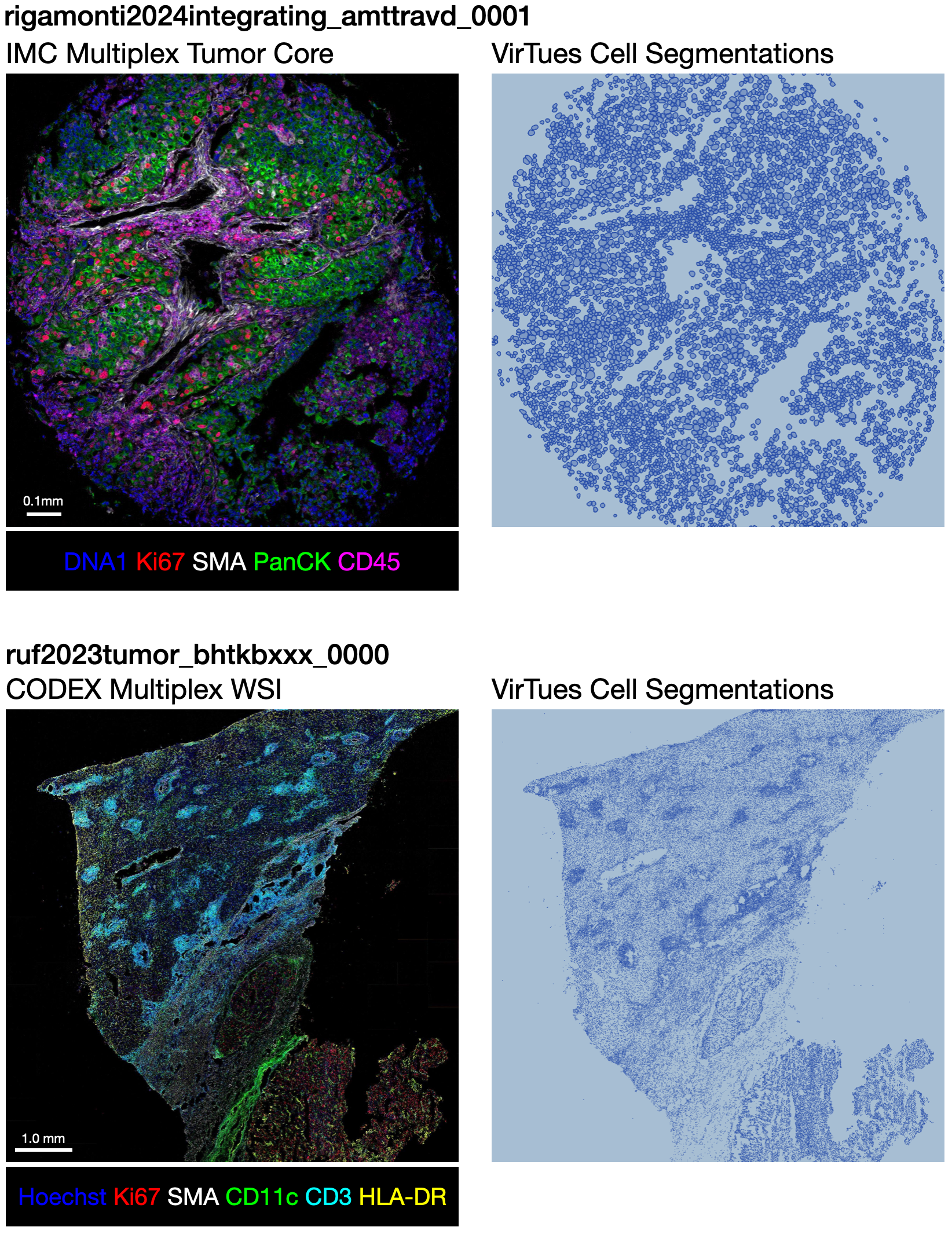
Instance segmentation masks where 0 is background and labels
1–N
identify individual cells. Stored as <tissue_id>.npz with key
"mask".
Cell semantic masks — cell_masks/<task_name>/
Semantic masks encoding cell type or category labels. One folder per categorization scheme,
named after the annotation source (e.g. cell_types, cell_categories).
May contain fewer labeled cells than the instance mask when not all cells are assigned a category.
Each folder contains:
- label_encoder.parquet
- Maps each category name (first column) to its integer index (second column).
- <tissue_id>.npz
- Category mask under key
"mask".
Tiling
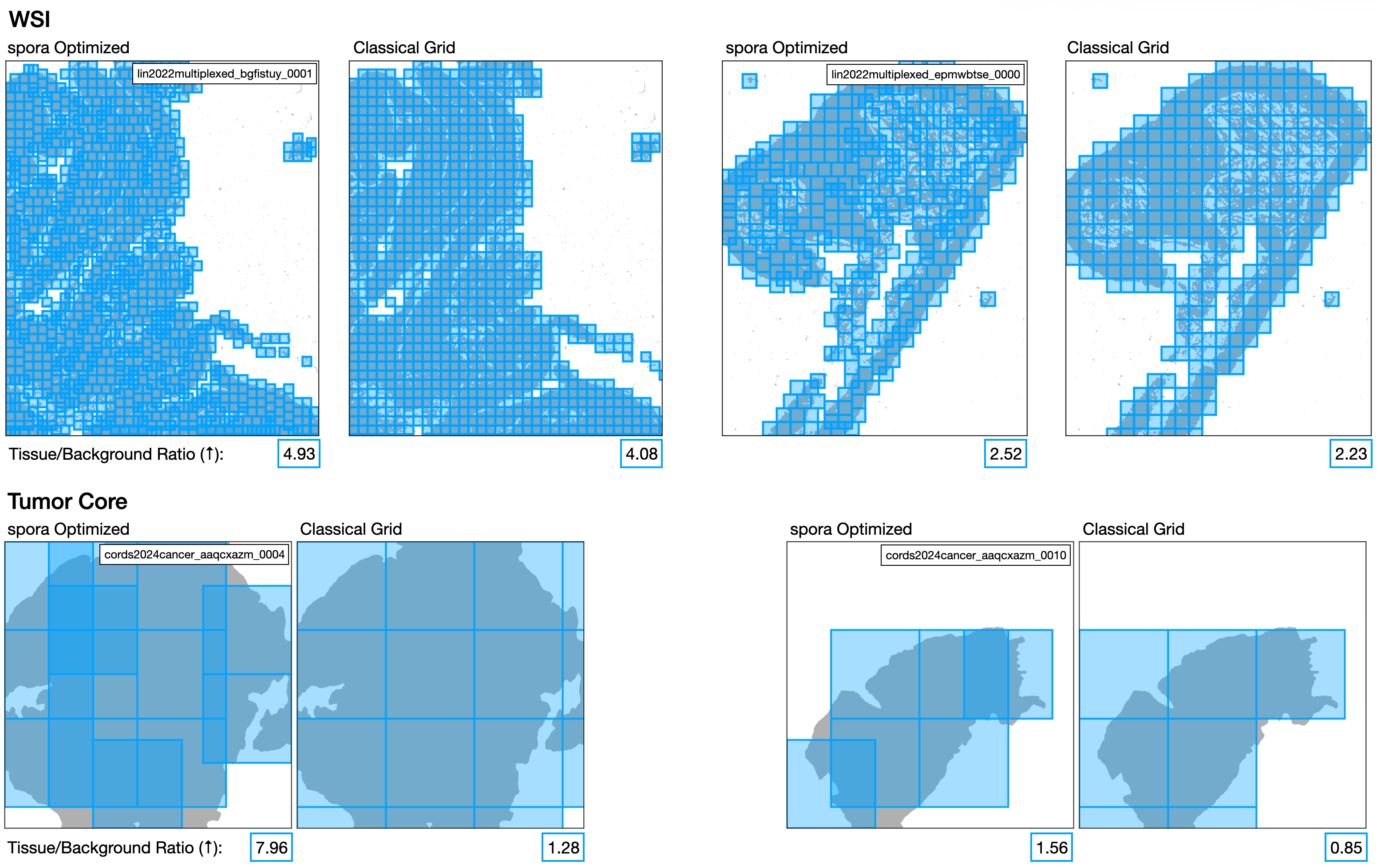
Pre-computed tile coordinates and statistics for efficient crop sampling, stored under
tiling/<resolution>/<tiling_strategy>/. Each tiling strategy folder
contains:
- <size>_tile_coordinates.parquet
- Coordinates of all valid tiles for each tissue, filtered against the tissue mask.
- <size>_tile_stats.parquet
- Summary statistics per tile (e.g. tissue coverage fraction).